Understanding Film Grain in Digital Restoration
Updated: Jul 24
How PFClean balances authenticity, clarity, and texture when restoring classic films and archive footage.

Film grain is one of the most defining characteristics of photochemical cinema. When restoring archival footage, managing grain correctly is essential to maintain both visual authenticity and perceived image quality.
Modern restoration workflows combine careful scanning, automated repair, and manual intervention to recover damaged footage. Within that process, film grain presents a unique challenge: it contains real image information, yet excessive or generational grain can obscure detail.
Tools such as PFClean give restoration artists precise control over grain behaviour, allowing them to preserve the organic character of film while maintaining visual clarity. This article explores how film grain works, why it matters in restoration, and how it can be carefully managed in digital workflows.
Table of contents
What Is Film Grain?
Film grain is the fine, random texture produced by the light-sensitive particles embedded within photographic film emulsions. These particles form the physical basis of the image captured on film. Unlike digital noise, which is typically an unwanted artefact, film grain is an inherent part of the image itself.
Most motion picture films contain emulsion layers composed of light-sensitive materials such as silver halide crystals (in black-and-white film) or dye-forming compounds (in colour film). These particles vary in size and distribution, which directly affects both image resolution and light sensitivity.
From Silver Halide to Pixels: The Development Path
The transition from a physical scene to a digital file begins with the chemical transformation of silver halide crystals suspended in the film's emulsion. Using black-and-white film as a simplified example, the final appearance of "grain" in digital restoration is a direct result of this specific chemical sequence:

Exposed Film (Latent Image): When light hits the film, it creates a "latent image", an invisible chemical map of the scene where brighter areas contain more energized crystals.
Developer: The film is submerged in a chemical solution that converts these exposed silver halide crystals into visible, dark metallic silver. This creates a "negative" where the brightest parts of the original scene appear the darkest on the film.
Stop Bath: A mild acidic solution is used to instantly neutralise the developer. This halts the chemical reaction immediately, ensuring consistent contrast and preventing the image from over-processing.
Fixer: The fixer removes any remaining unexposed (and thus undeveloped) silver halide crystals. This makes the image permanent and stable, meaning it is no longer sensitive to light.
Washing and drying: Water is used to strip away any residual chemicals that could cause the film to yellow or fade over time before drying ready for scanning and printing.
Scanned Image: Finally, the negative is digitally scanned into pixels and inverted to create a "positive." The physical clumps of metallic silver that remain are what we perceive as film grain, a unique organic texture that restoration artists must carefully manage to maintain the film’s original character.
Colour film process
Processing colour film is more complex with a couple of extra steps; in the final image rather than seeing the halides themselves you’re seeing the "dye clouds" left behind where the silver once was. While black and white grain in the final image tends to be sharp, contrasty and gritty, colour film grain takes on a more softer, diffused, and clumpy look.
Below are the steps taken to process colour negative motion picture film.
ECN2 Developement process:
Pre-Bath (Rem-Jet Removal): Cinema film has a black carbon backing called Rem-Jet to prevent light reflections and static. The pre-bath softens this layer so it can be physically washed off before development.
Color Developer: Uses a specific chemical (CD-3) that is different from consumer film. It develops the silver and activates the dye couplers to form the color image.
Stop Bath: A critical step in cinema processing to instantly halt the development.
Bleach: Converts the metallic silver back into silver halide. In ECN-2, this is often a "re-halogenating" bleach that prepares the silver for total removal.
Fixer: Dissolves all the remaining silver, leaving only the transparent cyan, magenta, and yellow dye layers.
Stabilizer / Final Rinse: A final bath that prevents the organic dyes from breaking down and ensures the film dries without water spots, which would be magnified on a cinema screen.
We have an article on film fade which covers colour film in more detail here.
Grain Size and Image Characteristics
The size of the grains influences the balance between detail and exposure sensitivity:

In this simplified, highly magnified, cross section of a very basic single emulsion layer black-and-white film above shows silver halide crystals of varied sizes. Smaller, less sensitive grains capture fine detail; larger, more sensitive grains yield lower fidelity. This mix creates the film's texture and tonal range. Advanced film stocks use multiple emulsion layers, varying in thickness, density, and grain size, for better light sensitivity, tonal latitude, and fidelity.
Colour films typically contain multiple emulsion layers, each responding to different wavelengths of light (red, green, and blue). Each layer also contains grains of varying sizes, contributing to the overall tonal range and texture of the final image.
The interwoven structure of these grains is what gives film its distinctive organic appearance.
Film Grain vs Digital Noise
Film grain is an inherent part of the image. It varies naturally frame-to-frame and carries real tonal and spatial information, contributing to texture, depth, and perceived detail.
Digital noise, by contrast, is primarily additive, a layer of unwanted signal added during capture, transmission, or compression. Visually this often looks like color speckle, luminance grain, banding, or fixed-pattern noise that sits on top of the underlying image data. Because it is extra, non-photographic information, digital noise can usually be reduced or modelled away without erasing the original recorded scene, provided denoising is applied carefully.
Modern film scanners typically include built-in noise reduction algorithms that suppress sensor and electronic noise during capture. This ensures the scanned digital image retains only the authentic film grain, preserving the film’s original texture for restoration work.
Why the Difference Matters
For restoration, this distinction is essential: grain should be preserved or accurately replicated, while digital noise can be selectively reduced. Confusing the two risks either erasing genuine texture or introducing artificial artifacts. We discuss preserving grain further in our article on remastering archive footage for redistribution.
Film Format, Stock, Processing, and Perceived Grain
The visibility and character of film grain are influenced by several interrelated factors: film format, film stock, laboratory processing methods, and digital scanning resolution. Together, these variables determine how grain ultimately appears in a restored image.
Film Format
The size of the film format dictates the physical area used to capture the image on the negative. Smaller gauges, such as Super 8 or Super 16, use a smaller portion of the film than 35mm or 65mm formats. Consequently, images captured on smaller formats must be magnified more during projection or digital scanning.
This increased magnification makes the film grain appear larger and more pronounced in smaller formats because the same grain structure is spread across a smaller area of the film. Therefore, when identical film stock is used across different formats (like Super 8, Super 16, and 35mm), the grain will appear more noticeable in the smaller format images when viewed at the same digital resolution.
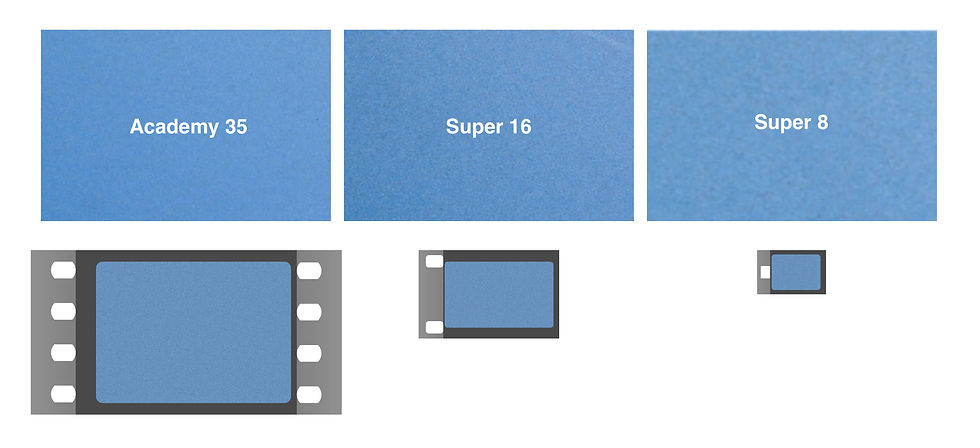
Understanding this relationship is essential when matching grain across shots or integrating repaired image regions.
Film Stock
The choice of film stock is a deliberate engineering trade-off between light sensitivity, grain structure, and image fidelity. These variables dictate the "texture profile" that restoration artists must navigate during the scanning and cleanup process.
The Mechanics of Film Speed
"Speed" (ISO/EI) refers to the sensitivity of the film's emulsion to light. This sensitivity is fundamentally tied to the size and arrangement of the silver halide crystals:
Surface Area: Larger halides provide a bigger "target" for photons. Consequently, they are more likely to be struck by light and undergo the chemical reaction required to form a latent image.
Reaction Time: Because they capture light more efficiently, high-speed stocks can form an image in lower light or with faster shutter speeds than low-speed stocks.
High-Speed vs. Low-Speed Stocks
In digital restoration, the difference between these stocks determines how much "organic noise" the artist has to manage or replicate.
High-Speed (e.g. Kodak Vision3 500T): Engineered for low-light or interior environments, these stocks utilize larger photosensitive particles. While this allows for exposure in challenging conditions, the resulting metallic silver clumps are physically larger, leading to a prominent, textured grain that is highly visible in the digital scan.
Low-Speed (e.g. Kodak Vision3 50D): Designed for bright daylight, these stocks use a much finer halide structure. Because the particles are smaller and more densely packed, they resolve subtler frame-to-frame variations. This results in higher perceived temporal detail and a smooth image texture that offers maximum clarity.

For restoration work, understanding the original film stock is important because it establishes the expected grain signature of the footage. Grain management decisions, whether preserving, reducing, or recreating texture, should align with the characteristics of the stock used during production.
Processing Methods
Laboratory processing techniques can significantly alter the appearance of film grain. In some cases, these methods are used deliberately to achieve a specific visual style, meaning the resulting grain structure is often an intentional artistic choice rather than a defect.
Push Processing
Push processing increases the effective sensitivity of a film stock by extending development time. This allows cinematographers to shoot in lower light conditions, but it also increases contrast and amplifies the grain structure, producing a rougher, more pronounced texture.
A well-known example is Saving Private Ryan (1998), where cinematographer Janusz Kamiński used push processing along with other photochemical techniques to create the gritty, documentary-like texture seen in the film’s combat sequences.
Bleach Bypass
Bleach bypass skips or reduces the bleaching stage during colour film processing, leaving metallic silver in the emulsion alongside the colour dyes. This produces a distinctive high-contrast, desaturated image while also emphasizing grain and image texture.
This technique has been used in films such as Seven (1995), photographed by Darius Khondji, where the process contributed to the film’s dark, textured aesthetic.
Optical Duplication and Layered Grain
Photochemical duplication, such as optical printing, internegatives, or composite effects, introduces additional generations of film. Each duplication layer adds its own grain structure, creating what restorers often refer to as layered or generational grain. These cumulative layers can make grain appear heavier or softer compared with the original camera negative.
Scanning Resolution
The final factor influencing perceived grain is the resolution used when scanning the film. Higher-resolution scans capture more of the film's granular detail and prevent aliasing artefacts and ensure accurate grain reproduction, something that is key for archival restoration work. Ideally proper sampling must follow the Nyquist-Shannon theorem, ensuring the scan frequency is sufficient to reproduce the highest spatial frequencies present in the film emulsion.
When scanning resolution is too low, grain may appear, smeared, blocky or digital.
Film Gauge | Typical Aspect Ratio | Resolvable Detail (Pixels)* | Minimum Recommended Scan Resolution |
Super 8 (Type S) | 1.32:1 | 927 × 663 | 1311 × 937 |
16mm (Standard) | 1.37:1 | 1642 × 1199 | 2322 × 1695 |
Super 35 (Type C) | 1.33:1 | 3988 × 2988 | 5639 × 4225 |
IMAX (15/70) | 1.43:1 | 11266 × 8258 | 15932 × 11679 |
*The potential resolvable detail is determined by the film stock.

Why Film Grain Matters in Digital Restoration
Film grain is more than just "noise"; it is a foundational element of the photochemical medium. In professional restoration, preserving or accurately emulating this grain is essential for maintaining artistic intent and historical authenticity and to help seat digital fixes so that they sit organically and seamlessly with the rest of the image.
Temporal vs. Spatial Detail
The primary difference between film and digital formats is how they render detail:
Film (Temporal): Detail is generated across time. Because grain patterns shift slightly with every frame, the human eye perceives a continuous, rich tone with scene information built up over a number of frames.
Digital (Spatial): Detail is fixed within static pixels.
Over-processing or "degraining" footage strips away this temporal richness, resulting in a flat, sterile "plastic" look.
Achieving Seamless Integration
When restoring frames, matching new elements (like digital titles or repairs) to the original stock is a precise science. If the grain scaling is off, the restoration will look artificial.


The true skill of a digital restoration artist lies in their ability to match the perceived scale and texture of the film grain to the given pixel resolution when performing repairs or digital clean-up, ensuring the restored image remains visually cohesive and filmic.
Precision Grain Management with PFClean
Modern digital restoration treats grain as a dynamic asset, requiring tools that offer surgical precision over its behavior. PFClean provides a resolution-agnostic environment that allows users to map grain distribution relative to image density, ensuring a consistent texture across the frame whether working with 16mm or 65mm stocks.

Film Grain and perceived detail
When an inferior film element, such as a print or dupe, is used as an insert, de-graining may be necessary for visual continuity, preventing a jarring effect for the viewer. To further improve this continuity, a fine, synthetic grain can be applied that accurately matches the camera original negative.
This technique is valuable because elements a generation removed from the original negative suffer from image softening, along with density and grain changes. By applying a closely matched, synthesised grain, the film element's perceived detail can be increased, leveraging the human visual system's sensitivity to high-frequency patterns.
Furthermore, introducing synthetic grain is a strategy employed by streaming platforms. It helps to mask compression artifacts and maintain visual integrity, even under low-bitrate streaming conditions. (Netflix blog)
Preserving Grain When Upscaling
Crucially, unlike many AI upscalers, which typically remove film grain as part of the upscaling process, PFClean's upscaling method preserves the original grain structure. This is an important distinction, and one we explore in more detail in our article on Remastering Archive Footage for Redistribution.
When Should De-graining Be Applied?
The decision to de-grain depends entirely on the purpose of the restoration. For a highly accurate archival restoration, the goal is usually to preserve the original photochemical texture and only replicate it where needed, meaning de-graining is kept to an absolute minimum to maintain historical integrity, and often avoided entirely.
Conversely, for commercial projects, such as ultra-high-definition HDR re-releases or streaming deliveries, selective de-graining is often necessary to ensure visual consistency across disparate elements or to optimise the footage for modern digital displays.
Sometimes, the decision to de-grain arises because access to the original source material is impossible. When working with prints or other multi-generation elements, accumulated grain can become distracting when viewed, so it may be desirable to strip back generations of grain stabilise the film's density and reapply a texture more closely resembling the stocks used in the original camera negative.
Due to the temporal nature of film, grain should never be judged from a static frame. Rolling the footage is the only way to deem when grain has become excessive or distracting.
Versatile Workflows with PFClean
For meticulous, shot-by-shot restorations, PFClean provides a highly controlled environment through its Workbench. Here, restorers can group shots that share similar characteristics, such as film stock, generation, or exposure conditions, and apply targeted manual de-graining and re-graining where necessary. This approach allows grain to be moderated only where it has become excessive, while preserving the natural texture of the surrounding material.
In contrast, projects with tighter schedules, such as preparing a theatrical print for a commercial re-release or streaming delivery, may benefit from broader texture adjustments. In these cases, PFClean’s Digital Wet Gate offers a faster approach by enabling global control of grain and image texture across an entire sequence or project. This allows restorers to reduce generational grain from print sources while maintaining a consistent filmic appearance throughout the program.
Both approaches serve different restoration goals: one prioritizes precision and archival fidelity, while the other emphasizes efficiency and visual consistency for modern distribution. The flexibility to move between these workflows allows restoration artists to tailor grain management to the specific needs of each project.
PFClean grain management vs AI grain management
Feature | PFClean Grain Management | AI Grain Management (General) |
Underlying Technology | Procedural, resolution-agnostic mathematical modeling based on image density. | Neural networks and machine learning algorithms trained on large datasets. |
Control & Precision | "Surgical precision" with manual, highly customizable controls. Restoration artists can selectively target specific densities or areas. | Mostly automated ("black box"). Users typically have broad slider controls (e.g., amount of denoise/texture) but lack localised precision. |
Visual Authenticity | Prioritizes preserving the organic, photochemical nature of the original film stock. Matches exact grain signatures. | Tends to aggressively smooth images; can sometimes strip away natural texture, resulting in a sterile or "plastic" look. |
Temporal Consistency | Excellent. Grain is mapped consistently across moving frames, preserving natural temporal variance without artifacts. | Can struggle with temporal consistency, occasionally hallucinating details or causing shifting/flickering textures between frames. |
Film Grain and Creative Intent
Aggressive grain removal can compromise the visual identity of the film. Budget-driven formats may justify subtle grain refinement or simulation to enhance clarity, but the organic character must remain intact.
Beyond technical reasons for removing film grain, the key question is: What was the creative intent behind choosing a specific film format and stock? If a director or cinematographer chose Super 16mm for its coarse grain and lower fidelity, to evoke texture, immediacy, or nostalgia, should we really degrain and sharpen it for technical perfection? Doing so risks erasing the very qualities that define its character.
Films like Darren Aronofsky’s The Wrestler (2008) and Kathryn Bigelow’s The Hurt Locker (2008) deliberately used Super 16mm to achieve a gritty, documentary-like realism that would be lost if over-processed. Conversely, if a film was shot on 16mm primarily for budgetary reasons but aspired to the polish of 35mm, a restoration might justifiably reduce grain or overlay a finer simulated 35mm grain structure to elevate perceived quality.
Restoration decisions must consider filmmaker intent.
FAQ
What is film grain?
Film grain is the fine, random texture created by light-sensitive particles — silver halide crystals in black-and-white film, or dye clouds in colour film — embedded in a film's emulsion. Unlike digital noise, grain is an inherent part of the captured image itself, not an unwanted artefact.
What's the difference between film grain and digital noise?
Film grain carries real tonal and spatial information and varies naturally frame-to-frame, contributing to texture and perceived detail. Digital noise is additive — an unwanted signal introduced during capture, transmission, or compression — and can typically be reduced without erasing the underlying image, whereas grain should be preserved or accurately replicated.
Why does film format affect how grain looks?
Smaller formats like Super 8 or Super 16 use less physical film area to capture an image than 35mm or 65mm, so they require more magnification during scanning. This makes grain appear larger and more pronounced in smaller formats, even when identical film stock is used.
How does film stock speed affect grain?
High-speed stocks (e.g. Kodak Vision3 500T) use larger silver halide crystals for better low-light sensitivity, producing more visible, textured grain. Low-speed stocks (e.g. Kodak Vision3 50D) use finer, more densely packed particles, resulting in smoother image texture with less visible grain.
Can lab processing techniques change grain, like push processing or bleach bypass?
Yes. Push processing extends development time to increase film speed, which also amplifies grain and contrast — as used in Saving Private Ryan. Bleach bypass leaves metallic silver in the emulsion alongside colour dyes, producing a high-contrast, desaturated look with emphasised grain, as used in Seven. These are deliberate creative choices, not defects.
When should de-graining be applied during restoration?
De-graining depends on the restoration's purpose. Archival restorations generally preserve original grain to maintain historical authenticity, while commercial re-releases or streaming deliveries may use selective de-graining for visual consistency across sources or to optimise footage for modern displays.
How does PFClean help manage film grain in restoration?
PFClean provides resolution-agnostic tools that let restorers map grain distribution relative to image density, matching grain across different film stocks and resolutions. Its Workbench supports precise, shot-by-shot de-graining and re-graining, while Digital Wet Gate offers faster, global grain control across an entire sequence.
See it on your own footage
Curious how PFClean handles grain? Request a personalised demonstration: send us a short sample of your most challenging material, and our specialists will produce a before-and-after that shows exactly what a faithful remaster looks like. To compare notes with restoration artists working on similar projects, you are also welcome to join the PFClean Support Community.
Conclusion
Film grain is an intrinsic component of photochemical imaging, carrying temporal nuance and texture. Controlled degraining improves clarity in multi-generation sources, but preserving natural grain is essential to maintain cinematic and historical authenticity.
With flexible tools like PFClean, restorers can experiment with different techniques, balancing technical needs, artistic goals, and preservation standards. Whether refining grain for broadcast delivery, matching new elements, or performing meticulous archival restoration, these tools provide the flexibility and precision required to maintain both the creative intent and historical integrity of the original work.
Related learning articles
About the Author
Adam Hawkes is a PFClean Product Specialist and restoration expert with over 20 years of hands-on experience in film and video restoration. Trained in film handling and film camera operation, Adam has contributed to more than 100 productions, including some of cinema's most celebrated titles. His expertise combines deep technical knowledge of restoration workflows with practical understanding of the physical and optical characteristics of film.


