PFClean Hardware Guide
Updated: Sep 3
Professional restoration performance on hardware you can actually afford
Recommended configurations for macOS, Windows, and Linux
The Pixel Farm Ltd — 2026
Table of Contents
Introduction
PFClean is engineered differently from other restoration tools. Where competing products demand expensive GPU workstations and high-throughput storage arrays to achieve professional results, PFClean is built from the ground up to deliver maximum performance from minimal hardware. It exploits modern GPU architectures so efficiently that it outperforms competing restoration suites running on systems costing an order of magnitude more.
But the hardware efficiency story goes deeper than GPU optimisation. PFClean’s architecture includes three performance advantages that fundamentally change what hardware you need, not just during processing, but across the entire lifecycle of a restoration project:
A non-destructive metadata workflow that stores every restoration decision, every scratch removal, colour correction, and stabilisation, as lightweight metadata rather than rendered image data. Where competing tools constantly read and write full frames to disk on every adjustment, PFClean generates a fraction of the I/O. The result is an interactive restoration experience where your creative decisions are never waiting for storage. An undo is instant. A parameter change is immediate. Switching between tools is seamless. No other restoration software works this way.
An intelligent frame cache that keeps source frames in fast local memory and serves them for every subsequent operation. Multi-pass automated processing, interactive scrubbing, manual retouching, and preview rendering all work from the cache rather than re-reading from disk. This means a modest NVMe SSD delivers the kind of responsive, fluid experience that competing tools can only achieve with multi-thousand-pound RAID arrays.
Selective rendering with multi-format batch export that makes the final delivery stage as efficient as the creative stage. When the restoration is complete and it’s time to render the finished film, PFClean reads each original source frame once, applies only the pixels that were actually changed by the restoration metadata, and writes the output. Frames that needed no restoration pass through with minimal processing. And because there are no intermediate files to read back and re-composite, PFClean can render multiple deliverables simultaneously, archive master, grading output, and review proxy, in a single batch pass. One read of the source material, multiple outputs. Competing destructive tools must re-read and re-composite entire chains of intermediate renders for every output format, multiplying both the I/O and the time.
Together, these three architectural choices mean PFClean doesn’t just need less GPU power than competitors, it needs less storage performance, less storage capacity, and less storage spend at every stage of the workflow: ingest, interactive restoration, and final delivery. The hardware savings compound across every component in the system and across every phase of the project.
This guide covers recommended hardware configurations across all three platforms PFClean supports: macOS, Windows, and Linux. Whether you are setting up a single workstation for a boutique restoration house or deploying a multi-seat pipeline for a national archive, this guide will help you choose hardware that delivers professional-grade results without a premium hardware investment.
The headline: PFClean on an M4 Mac Mini Pro outperforms competing restoration tools on workstations costing ten times more. A complete professional restoration workstation, software and hardware, for under £4,000. Not because it compromises on quality, but because its architecture is fundamentally more efficient at every level: GPU, storage, and workflow, from the first frame you view to the final deliverable you export.
MacOS: The Recommended Platform
PFClean runs natively on Apple Silicon and is deeply optimised for the unified memory architecture of M-series chips. This means the GPU, CPU, and Neural Engine share the same high-bandwidth memory pool, eliminating the data transfer bottlenecks that limit performance on traditional discrete-GPU systems. The result is restoration performance that punches far above the hardware’s price point.
For the majority of PFClean users, a Mac with Apple Silicon is the recommended platform. It delivers the best performance-per-pound of any configuration, with the lowest power consumption, the smallest physical footprint, and zero fan noise under typical restoration workloads.
Our Recommendation: M4 Mac Mini Pro
Best value. Best performance-per-pound. Our number one recommendation for any new PFClean deployment.

The M4 Mac Mini Pro is our top recommendation for PFClean. It delivers professional restoration performance that outpaces competing tools running on workstations costing £15,000 or more, in a form factor smaller than a stack of DVDs, drawing a fraction of the power.
Configuration | Good | Better |
Model | M4 Mac Mini | M4 Pro Mac Mini |
CPU | 10-core | 12-core / 14-core |
GPU | 10-core | 16-core / 20-core |
Unified Memory | 16 GB (minimum) / 32 GB (recommended) | 24 GB / 48 GB |
Storage | 512 GB SSD (add external for media) | 1 TB+ SSD |
Approx. UK Price (2026) | From ~£599 | From ~£1,399 |
Power Draw (typical) | ~15–30W | ~35–70W |
PFClean Suitability | SD/HD restoration, light 2K work, learning and evaluation | Full 2K/4K restoration, batch processing, production workloads |
Why the Mac Mini Pro wins: Apple Silicon’s unified memory architecture means the GPU and CPU share the same high-bandwidth memory pool. PFClean’s GPU-accelerated processing exploits this directly, avoiding the PCIe bandwidth bottleneck that limits discrete-GPU systems. A 24 GB M4 Pro has its full memory available to both CPU and GPU simultaneously, on a traditional workstation, you would need to buy separate system RAM and GPU VRAM, typically doubling the memory cost.
Also Excellent: MacBook Pro and Mac Studio
For users who need portability or higher-end configurations, the MacBook Pro and Mac Studio are also excellent PFClean platforms. The MacBook Pro is ideal for on-location restoration review and field work.

The Mac Studio is available with M4 Max or M3 Ultra chips, the M3 Ultra model provides the highest Apple Silicon performance currently available, with up to 80 GPU cores and up to 512 GB of unified memory, for the most demanding 4K/8K workflows and very large batch processing runs.
MacBook Pro 14" | MacBook Pro 16" | Mac Studio | |
Best For | Portable restoration review, field work, client presentations | On-location production, full 4K restoration with portability | Maximum Apple Silicon performance, 8K workflows, heavy batch processing |
Chip Options | M4 Pro / M4 Max | M4 Pro / M4 Max | M4 Max / M3 Ultra |
Approx. UK Price | From ~£1,999 | From ~£2,499 | From ~£2,099 (M4 Max) / ~£4,199 (M3 Ultra) |
Our advice: Start with the M4 Pro Mac Mini. For most restoration work, including professional 4K processing and batch workflows, it is more than sufficient and represents the best value in the range. Only step up to the Mac Studio if you are routinely processing 8K material or running extremely large batch jobs where the additional GPU cores and memory bandwidth of the M4 Max or M3 Ultra make a measurable difference.
Windows: For Studios in Existing Windows Ecosystems
PFClean runs on Windows with GPU acceleration via OpenCL, ensuring cross-platform consistency across macOS, Windows, and Linux. OpenCL support means PFClean works with both NVIDIA and AMD GPUs, giving you flexibility to choose the best-value hardware for your budget. You do not need a top-tier GPU, PFClean’s efficient architecture means a mid-range card delivers excellent results.

Recommended Configurations
Entry | Production | High-End | |
CPU | Intel i5-14600K / AMD Ryzen 5 7600X | Intel i7-14700K / AMD Ryzen 7 7800X3D | Intel i9-14900K / AMD Ryzen 9 7950X |
GPU | NVIDIA RTX 4060 (8 GB) or AMD RX 7600 (8 GB) | NVIDIA RTX 4070 Super (12 GB) or AMD RX 7800 XT (16 GB) | NVIDIA RTX 4080 Super (16 GB) or AMD RX 7900 XT (20 GB) |
System RAM | 32 GB DDR5 | 64 GB DDR5 | 128 GB DDR5 |
Storage | 1 TB NVMe SSD | 2 TB NVMe SSD | 2 TB NVMe + NAS/SAN |
OS | Windows 10/11 Pro | Windows 10/11 Pro | Windows 10/11 Pro |
Approx. UK Build Cost | ~£1,200–£1,500 | ~£2,000–£2,500 | ~£3,500–£4,500 |
Power Draw (system) | ~200–300W | ~300–450W | ~450–600W |
PFClean Suitability | SD/HD restoration, 2K work, single-project workflows | Full 2K/4K restoration, batch processing, production workloads | 4K/8K restoration, heavy batch processing, enterprise pipelines |
Key Points for Windows Users
NVIDIA or AMD, your choice. PFClean uses OpenCL for GPU acceleration across all platforms, which means it works with both NVIDIA GeForce/RTX and AMD Radeon GPUs. This gives you the freedom to choose whichever card offers the best value at the time of purchase. Ensure you have current GPU drivers installed.
VRAM matters more than clock speed. For restoration work, GPU memory (VRAM) determines how large a frame can be processed on the GPU. 8 GB is adequate for HD and 2K. 12 GB is comfortable for 4K. 16 GB provides headroom for 4K+ and complex multi-pass workflows.
You do not need a professional GPU. PFClean runs excellently on consumer-grade GPUs from both NVIDIA and AMD. For production restoration work, a mid-range card with 12–16 GB VRAM offers the best balance of performance and price. Professional-grade GPUs (NVIDIA RTX A-series or AMD Radeon Pro) are only necessary if your pipeline requires certified drivers or ECC memory for other applications.
NVMe storage is strongly recommended. Restoration workflows involve reading and writing large image sequences (DPX, OpenEXR). An NVMe SSD dramatically reduces I/O wait times compared to SATA SSDs or spinning drives. For large archives, a fast NVMe working drive paired with a NAS for long-term media storage is the ideal configuration.
Linux: For Enterprise and Pipeline Environments
PFClean runs on Rocky Linux 8 and 9, providing compatibility with enterprise and studio pipeline environments. GPU acceleration uses OpenCL, identical to the Windows and macOS implementations, ensuring consistent behaviour across all platforms. Linux deployment is typically chosen by larger facilities that require headless batch processing, integration with render farm infrastructure, or centralised license management via PFBucket.
Recommended Configurations
Hardware recommendations for Linux are functionally identical to Windows. The same CPU, GPU, RAM, and storage guidance applies. The key differences are operational:
✓ Rocky Linux 8 or 9 (RHEL-compatible). Other distributions are not officially supported.
✓ NVIDIA or AMD GPU with current OpenCL-capable drivers required. For NVIDIA, use proprietary drivers (Nouveau is not sufficient). For AMD, use AMDGPU-PRO or Mesa with OpenCL support.
✓ Headless operation supported for batch processing and render farm integration.
✓ PFBucket license server available for on-premise, air-gapped, and multi-site deployments (Enterprise edition).
✓ CLI and Python scripting for automated pipeline integration.
Enterprise deployment note: For multi-seat archive deployments on Linux, contact The Pixel Farm directly to discuss enterprise licensing, PFBucket server configuration, and volume hardware procurement. We can advise on optimal configurations for your specific throughput requirements.
Local Storage: Getting the Most from PFClean
Storage is the unsung hero of restoration performance. A fast GPU and plenty of RAM count for little if the system is waiting for media to load from a slow drive. PFClean is designed to exploit intelligent caching, which means the right local storage strategy can deliver dramatically better performance than raw drive specifications alone would suggest, and at a fraction of the cost of traditional external storage solutions.

How PFClean Uses Caching
PFClean’s processing architecture is built around an intelligent frame cache that keeps recently accessed and upcoming frames in fast local memory. Rather than reading every frame from storage for every operation, PFClean caches frames locally as they are accessed, then serves subsequent passes, previews, and adjustments directly from the cache. This means:
✓ Interactive scrubbing and playback feel responsive even when the underlying media is on slower storage, once a section of frames has been loaded, subsequent access is near-instantaneous
✓ Multi-pass restoration operations (where the same frames are processed through several automated tools in sequence) benefit enormously, as the frames are read from disk once and served from cache for every subsequent pass
✓ Manual retouching workflows, where an artist repeatedly views and adjusts individual frames, become fluid rather than I/O-bound
✓ Preview rendering during parameter adjustment is fast because the source frames are already cached, only the processing needs to be recalculated, not the I/O
The practical result: PFClean’s caching architecture makes it far less dependent on sustained storage throughput than competing tools. Where a competitor might demand a multi-thousand-pound external RAID array to maintain real-time 4K playback, PFClean achieves equivalent interactive performance by caching intelligently from a comparatively modest storage backend.
We have created a complete technical guide to disk caching in PFClean found here.
The Metadata Workflow: PFClean’s Hidden Performance Advantage
Beyond frame caching, PFClean has a deeper architectural advantage that fundamentally changes the relationship between storage speed and user experience: its non-destructive, metadata-driven workflow.
Most restoration software works destructively or semi-destructively, when you apply a filter, remove a scratch, or adjust colour, the software either modifies the source media directly or writes large intermediate files to disk. Every adjustment generates I/O. Every undo requires re-reading. Every parameter change triggers a new write cycle. This is why competing tools demand fast, high-capacity storage for every operation: they are constantly reading and writing full frames of image data.
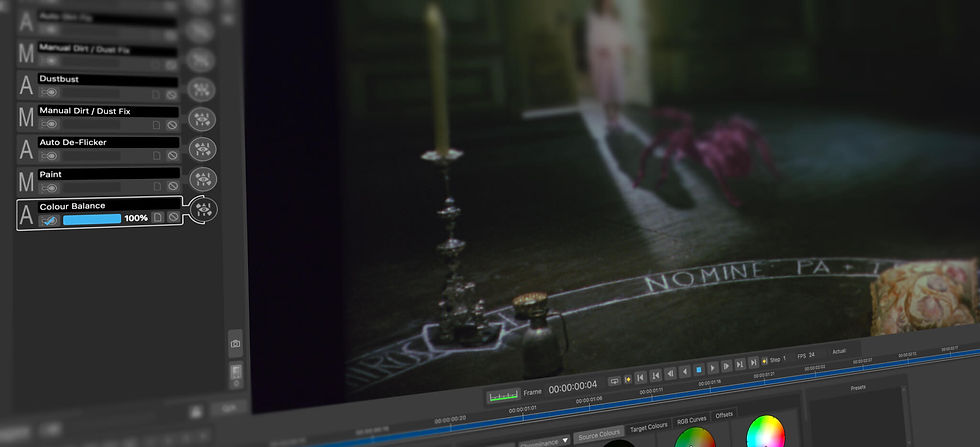
PFClean works differently. Restoration decisions in PFClean are stored as lightweight metadata, not baked into the image data. When you remove a scratch, PFClean records the instruction (where it is, what to do about it), not a new copy of the frame. When you adjust colour, it stores the correction parameters, not a re-rendered image. When you stabilise a sequence, it records the motion vectors, not a reprocessed output. The original media is never modified.
This metadata-driven approach has a profound effect on storage performance:
✓ Project files are tiny — kilobytes to low megabytes of metadata versus gigabytes or terabytes of rendered intermediates. On an NVMe SSD, saving and loading project state is effectively instantaneous
✓ Undo and redo are near-instant — PFClean reapplies metadata instructions rather than reading back previously rendered frames from disk. There is no I/O penalty for iterating
✓ Parameter adjustment is interactive — changing a restoration parameter recalculates the processing from cached source frames using updated metadata. No intermediate files need to be read or written. On an NVMe drive, the gap between adjusting a slider and seeing the result is imperceptible
✓ Switching between restoration tools is seamless — because each tool’s work is stored as metadata, not as modified frames, moving between defect removal, colour correction, and stabilisation involves no file I/O at all
✓ Batch reprocessing is dramatically faster — if you change a parameter that affects an entire sequence, PFClean reprocesses from the original cached frames with the new metadata. It does not need to read back, modify, and rewrite a previously rendered intermediate
Why NVMe amplifies this: PFClean’s metadata workflow already minimises I/O, but the I/O that does occur — loading source frames into cache, saving project metadata, writing final exports — benefits enormously from NVMe speeds. The combination of a metadata architecture that avoids unnecessary I/O and an NVMe drive that handles the remaining I/O at 3,000–7,000+ MB/s creates an interactive experience that feels like working with the entire project in RAM, even on modest hardware.
This is a standout capability that other restoration software cannot match. Competing tools that render and store intermediate files hit a wall where storage speed limits interactivity, no matter how fast the GPU or how much RAM is available, the workflow stalls waiting for disk I/O. PFClean’s metadata architecture removes that wall entirely. The result is a restoration workflow where the artist’s creative decisions are never gated by storage performance, and where a £100 NVMe SSD delivers a more responsive experience than a £5,000 RAID array running a conventional tool.
The Fast Cache + Bulk Storage Strategy
The most cost-effective storage strategy for a single PFClean workstation combines two tiers of local or directly-attached storage:
Tier 1: Fast NVMe cache drive — a high-speed internal NVMe SSD (the one built into your Mac or PC) holds the active project and serves as the primary cache. PFClean reads media from this drive at full NVMe speed (3,000–7,000+ MB/s on modern drives) and caches frames here for interactive work. This is where the performance magic happens.
Tier 2: Bulk media storage — a larger, slower, and much cheaper drive (external USB-C/Thunderbolt HDD, NAS, or even a modest SATA SSD) holds the broader media library. When you start work on a new reel or tape, the media is pulled from bulk storage onto the fast cache drive. Completed projects are moved back to bulk storage for archiving.
This two-tier approach means you only need enough fast NVMe capacity for 1–2 active projects at a time, not your entire media library. A 1 TB internal SSD costing £80–£120 as a cache drive, paired with a 4–8 TB external USB-C drive costing £80–£200, gives you fast interactive restoration and ample library storage for under £300 total.
Recommended Local Storage Configurations
Workflow | Fast Cache (NVMe) | Bulk Storage | Approx. Storage Cost |
SD/HD restoration, occasional use | 512 GB internal SSD (often included with machine) | 2–4 TB external USB-C HDD | ~£60–£100 |
2K restoration, regular production | 1 TB internal NVMe SSD | 4–8 TB external USB-C SSD or HDD | ~£150–£300 |
4K restoration, batch processing | 2 TB internal NVMe SSD | 8–16 TB external Thunderbolt SSD or NAS | ~£400–£800 |
4K/8K, large archive projects | 2–4 TB internal NVMe SSD | NAS over 10GbE (see Scaling Up section) | ~£800+ (NVMe) + NAS cost |
Mac Mini Pro note: The M4 Pro Mac Mini ships with a 512 GB or 1 TB internal NVMe SSD and includes Thunderbolt 5 and USB-C ports for external storage. The internal SSD is extremely fast (reported sequential reads of 6,000–7,000+ MB/s) and serves as an ideal PFClean cache drive. Pair it with any external USB-C or Thunderbolt drive for bulk library storage.
Why This Beats Traditional External Storage
Competing restoration tools that lack PFClean’s caching architecture and metadata-driven workflow demand sustained high-throughput storage for every operation. Because they write rendered intermediates and modified frames to disk on every adjustment, their performance is directly limited by storage speed. PFClean’s combination of intelligent caching and a non-destructive metadata workflow means it simply does not generate the I/O that forces competitors to require expensive storage. This typically means:
Traditional Approach | Typical Cost | Why It’s Needed | PFClean Alternative |
Thunderbolt RAID array (4–8 bay) | £2,000–£6,000+ | Sustained multi-GB/s throughput for real-time 4K playback without caching | PFClean’s frame cache delivers equivalent interactive performance from the internal NVMe SSD. No external RAID needed. |
Multi-drive external enclosure (JBOD/RAID) | £1,000–£3,000 | Aggregate bandwidth from multiple spinning drives to approach SSD speeds | A single external USB-C SSD (£100–£300) provides ample bandwidth for PFClean’s background media loading. Caching handles the rest. |
High-end Thunderbolt SSD (fast, large capacity) | £800–£2,500 | All media on fast SSD to avoid I/O bottlenecks during processing | Only the active project needs to be on fast storage. PFClean’s cache means you don’t need your entire library on premium SSD. |
Direct-attached SAN / Fibre Channel | £5,000–£20,000+ | Guaranteed I/O bandwidth for demanding workflows | PFClean on a Mac Mini Pro with a 10GbE NAS achieves comparable interactive performance for multi-seat deployments at a fraction of the cost. |
The bottom line: PFClean’s intelligent caching and metadata-driven workflow mean you do not need to solve your storage problems with expensive hardware. Because restoration decisions are stored as lightweight metadata rather than rendered intermediates, PFClean generates a fraction of the disk I/O that competing tools demand. A £150 NVMe SSD and a £100 external drive deliver interactive restoration performance that competing tools can only achieve with storage systems costing ten to twenty times more. The savings are real and immediate.
Practical Tips
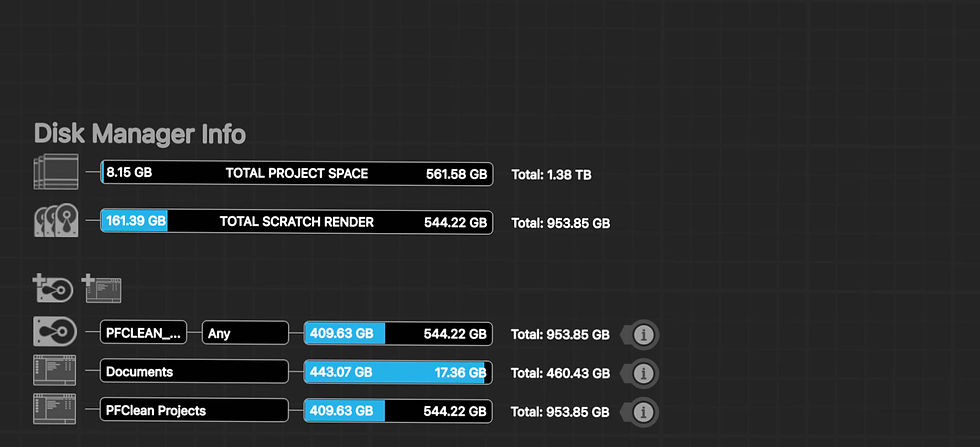
Keep your active project on the fast drive. When you start work on a new reel or tape, copy or move it from bulk storage to the internal NVMe SSD. Work on it there. PFClean’s caching will keep the frames you’re working with in fast memory, and the NVMe drive will handle any cache misses at full speed. When the project is complete, export the restored output and move the source media back to bulk storage.
Don’t worry about the bulk drive being slow. The bulk storage tier only needs to be fast enough to transfer media to and from the cache drive between projects. Even a USB-C spinning hard drive at 100–150 MB/s can transfer a full 2K feature (~1.7 TB) in under 4 hours. A USB-C SSD does it in 30–45 minutes. Neither speed matters during active restoration work, that’s all happening on the cache.
Size the cache drive for your typical project. A 90-minute HD feature as DPX is approximately 1 TB. A 90-minute 2K feature is approximately 1.7 TB. A 1 TB internal SSD handles most HD and 2K projects comfortably; 2 TB gives headroom for 4K or for having two projects cached simultaneously.
Consider a USB-C SSD for the best value bulk storage. A 4 TB portable USB-C SSD (Samsung T7, SanDisk Extreme, or similar) costs £200–£300 and reads at 1,000–2,000 MB/s, fast enough to serve as both bulk storage and a secondary cache if needed. This single external drive replaces what would traditionally be a multi-drive RAID enclosure.
For very large libraries, a NAS is still the right choice. If your media library exceeds 8–16 TB, a desktop NAS (Synology, QNAP) over the Mac Mini Pro’s built-in 10GbE provides excellent bulk storage with the capacity to grow. The same caching principle applies: pull media from the NAS to the local NVMe for active work, push it back when done. See the Scaling Up section for NAS recommendations.
Final Render: Where It All Comes Together
Throughout the restoration process, PFClean’s metadata workflow means no pixels have been permanently altered. Every scratch removal, colour correction, stabilisation, and defect repair exists as a lightweight instruction stored against the original, untouched source frames. The creative work is done. The interactive experience has been fluid and responsive on modest hardware. But at some point, the restored film needs to be rendered out into deliverable files.
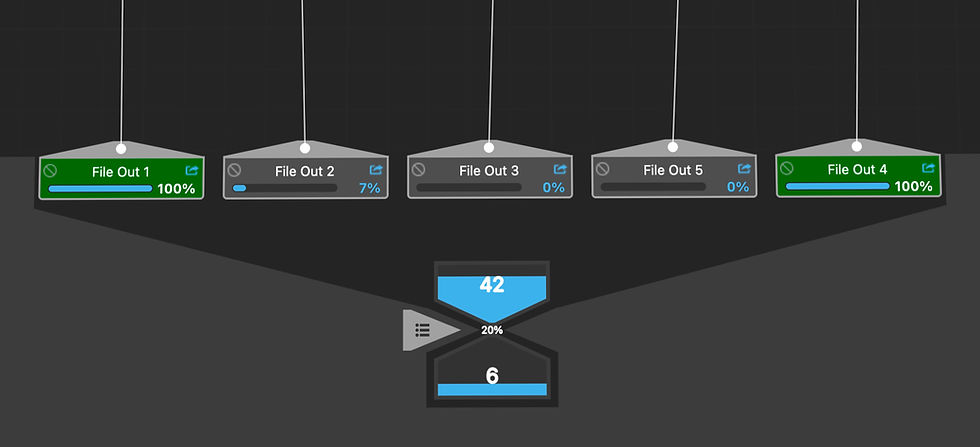
This is where PFClean’s architecture pays its final dividend. When you render, PFClean reads each original source frame from cache or disk, applies only the metadata instructions that affect that frame, the specific pixels that were adjusted, corrected, or restored, and writes the finished frame to the output file. Frames that required no restoration pass through with minimal processing. Frames with localised repairs (a scratch across one area, a dust spot in another) only process the affected regions. The entire sequence does not need to be re-rendered from a chain of destructive intermediate files, because those intermediates were never created.
This is fundamentally more efficient than the approach taken by destructive restoration tools, where final output requires reading back every intermediate render that was written during the restoration process, often multiple intermediates per frame, one for each processing stage, and compositing them together into the final output. That approach multiplies both the I/O and the processing required at render time.
Better still, PFClean can render multiple deliverables simultaneously in a single batch pass. A restoration project typically requires several output formats: a high-resolution DPX or OpenEXR master for the archive, a ProRes version for editorial or grading in DaVinci Resolve, and perhaps a lower-resolution proxy for review or cataloguing. In a destructive workflow, each deliverable is a separate render pass reading from the same intermediates, multiplying the I/O and processing time by the number of outputs. PFClean renders all requested deliverables from the same single read of the source frames plus metadata, writing each format in parallel. One pass through the material, multiple outputs.
The storage performance message comes full circle here. During interactive restoration, PFClean’s metadata workflow and frame cache minimise I/O, making modest NVMe storage feel limitless. At final render, the same architecture ensures the output stage is as efficient as possible, reading originals once, applying only the changed pixels, and writing multiple deliverables in a single batch. A fast NVMe cache drive that made the creative process fluid now makes the delivery process fast. And because PFClean never created gigabytes of intermediate files along the way, there is nothing to clean up, nothing to re-composite, and nothing wasted. From first frame to final deliverable, the architecture is designed to do less I/O, not more, which is why a £1,400 Mac Mini Pro and a £150 SSD can deliver what competitors need a £15,000 workstation and a £5,000 RAID array to achieve.
Total Cost of Ownership: The Full Picture
When evaluating restoration tools, hardware cost is often overlooked. Most competing restoration products require high-end workstations with expensive discrete GPUs and large amounts of dedicated VRAM to achieve acceptable performance. PFClean’s efficient architecture changes this equation fundamentally.
The following comparison illustrates the total first-year cost of a PFClean restoration workstation versus a typical competing setup:
PFClean + Mac Mini Pro | Typical Competitor Setup | |
Software (1 year) | £2,499 (365-day rental) | £3,000–£6,000+ (typical annual licence) |
Hardware | £1,399 (M4 Pro Mac Mini) | £8,000–£15,000+ (workstation with high-end GPU) |
Monitor | £500–£1,500 (colour-accurate display) | £500–£1,500 (colour-accurate display) |
Total First Year | £4,398–£5,398 | £11,500–£22,500+ |
Annual Power Cost (est.) | ~£50–£80 (35–70W typical) | ~£200–£400 (300–500W typical) |
Physical Footprint | 12.7 cm square, fits on any desk | Full tower workstation, requires dedicated desk space |
Noise Under Load | Near-silent | Significant (GPU fans, CPU cooler, PSU fan) |
Saving: £7,000–£17,000+ per workstation in the first year. For a four-seat archive deployment, that is £28,000–£68,000 saved — enough to fund the entire restoration programme itself.
Multi-Seat Deployment Economics
The cost advantage compounds dramatically at scale. Archives and studios deploying multiple restoration seats see the largest savings:
Seats | PFClean + Mac Mini Pro (total) | Typical Competitor (total) | Saving |
1 | ~£3,898 | ~£11,000–£21,000 | £7,000–£17,000 |
4 | ~£15,592 | ~£44,000–£84,000 | £28,000–£68,000 |
8 | ~£31,184 | ~£88,000–£168,000 | £57,000–£137,000 |
Multi-seat figures assume PFClean 365-day rental per seat plus one M4 Pro Mac Mini per seat (excluding monitors). Competitor figures based on typical annual software licensing plus workstation hardware requirements for equivalent performance. Contact The Pixel Farm for volume licensing pricing.
Power Consumption and Sustainability
For archives and institutions running restoration workstations 8–12 hours per day, power consumption is a meaningful operational cost and an increasingly important sustainability consideration. Many public institutions now have explicit carbon reduction targets.
M4 Pro Mac Mini | Typical GPU Workstation | |
Typical Power Draw (under load) | 35–70W | 300–500W |
Annual Energy (8 hrs/day, 250 days) | 70–140 kWh | 600–1,000 kWh |
Annual Energy Cost (~£0.30/kWh) | £21–£42 | £180–£300 |
CO₂ per year (~0.21 kg/kWh UK grid) | 15–29 kg | 126–210 kg |
CO₂ saving per seat per year | ~100–180 kg avoided |
For an eight-seat archive deployment, switching from traditional workstations to Mac Minis saves approximately 800–1,400 kg of CO₂ per year and reduces the annual electricity bill by over £1,200. These are the kinds of figures that resonate with institutional sustainability officers and can support grant applications from bodies such as the Heritage Lottery Fund, Arts Council England, and EU cultural preservation programmes.
Scaling Up: Studios, Facilities, and Archives
The single-seat recommendations above cover the majority of PFClean buyers. But for archives running multi-seat restoration programmes, studios with dedicated restoration departments, and facilities managing large-scale digitisation projects, there are additional infrastructure considerations that affect hardware choices.
Shared Storage
A single PFClean workstation reads and writes media to its local SSD. Multiple seats sharing a media library need network-attached or direct-attached shared storage that can sustain the required bandwidth.
Resolution | Format | Per-Seat Bandwidth | 4-Seat Aggregate |
HD (1920×1080) | 10-bit DPX | ~200 MB/s | ~800 MB/s |
2K (2048×1556) | 10-bit DPX | ~300 MB/s | ~1.2 GB/s |
4K (4096×3112) | 16-bit OpenEXR | ~800 MB/s–1.2 GB/s | ~3.2–4.8 GB/s |
For HD and 2K workflows: A quality NAS over 10 Gigabit Ethernet (10GbE) provides sufficient bandwidth for up to 4–6 simultaneous seats. The Mac Mini Pro includes a 10GbE port as standard, making it plug-and-play for shared storage environments.
For 4K workflows: Consider 25GbE networking or direct-attached storage (Thunderbolt RAID) for each seat. Alternatively, use a hybrid approach: fast local NVMe for the active project with a NAS for the broader media library.
Recommended NAS vendors: Synology, QNAP, and TrueNAS (open-source) all offer 10GbE-capable systems suitable for restoration workflows. For 4K+ at scale, consider dedicated storage solutions from LumaForge (Jellyfish), EditShare, or similar media-optimised shared storage platforms.
Network Infrastructure
For multi-seat PFClean deployments, a dedicated 10GbE network between workstations and shared storage is strongly recommended. The M4 Mac Mini Pro includes 10GbE as standard. For Windows and Linux workstations, a 10GbE PCIe network card is typically £100–£200.
Keep restoration traffic on a separate VLAN or physical switch from general office network traffic. A simple 10GbE switch (e.g., MikroTik CRS305, ~£130 for 4 ports) is sufficient for small deployments. Larger facilities should use managed switches with appropriate port density.
License Management at Scale
PFClean Enterprise includes PFBucket, The Pixel Farm’s local license server. PFBucket enables:
✓ Floating licenses shared across any authorised workstation on the network
✓ Fully offline, air-gapped operation — no internet connection required after initial setup
✓ Multi-site deployment with license distribution across departments or geographic locations
✓ Centralised license management with full visibility of seat usage and allocation
For archive deployments where security and network isolation are requirements, PFBucket’s air-gapped capability is essential. The license server runs on any machine on the local network and manages entitlements without any external connectivity.
Batch Processing and Automation
Archives processing thousands of reels benefit from PFClean’s automation capabilities:
✓ Batch processing queues — queue multiple reels or tapes for sequential automated restoration
✓ Non-destructive project files — all restoration decisions are stored as metadata, not baked into the media. Processing can be re-run with different parameters without re-scanning
✓ Overnight processing — artists set up restoration parameters during the day, batch jobs run unattended overnight on the same workstations
✓ CLI and Python scripting (Enterprise edition) — integrate PFClean into automated ingest and delivery pipelines
A practical workflow for a multi-seat archive: four seats run interactive restoration during business hours, then all four switch to batch processing overnight, effectively doubling throughput without additional hardware.
Typical Ingest-to-Delivery Pipeline
PFClean sits at the centre of a restoration pipeline, receiving scanned media and outputting restored sequences for grading and delivery:
1. Scan — Film scanner (NorthLight, Lasergraphics ScanStation, Kinetta) or tape deck outputs DPX, TIFF, EXR or ProRes to shared storage.
2. Ingest — PFClean imports media from shared storage. EDL conforming aligns scanned reels to the edit reference.
3. Restore — Interactive restoration: automated defect removal, manual retouching, stabilisation, colour correction. Non-destructive throughout.
4. Review — On-screen review within PFClean. For client or stakeholder review, export preview renders to screening systems.
5. Export — Output restored sequences as DPX, OpenEXR, TIFF, EXR or ProRes. OCIO colour management ensures accurate handoff.
6. Grade — DaVinci Resolve, Baselight, or other grading platform receives the restored media for final colour and delivery.
7. Archive — Master files and PFClean project metadata archived to long-term storage (LTO tape, cloud, or institutional repository).
Reference Deployments
4-Seat Archive Deployment (Recommended)
Component | Specification | Approx. Cost |
Workstations (x4) | M4 Pro Mac Mini, 24 GB, 1 TB SSD | 4 × £1,399 = £5,596 |
Monitors (x4) | Colour-accurate display (e.g., BenQ SW272U or ASUS ProArt) | 4 × £800 = £3,200 |
Shared Storage | Synology RS1221+ or similar NAS, 8-bay, 10GbE, 48–96 TB raw | ~£3,000–£5,000 (inc. drives) |
Network Switch | 10GbE switch, 8+ ports (e.g., MikroTik CRS309 or QNAP QSW-M408) | ~£300–£500 |
PFClean Licences (x4) | 365-day rental per seat (or Enterprise floating) | 4 × £2,499 = £9,996/year |
Total (first year) | ~£22,000–£24,500 |
Compare: a four-seat deployment with competing restoration software typically costs £44,000–£84,000+ in the first year. PFClean delivers equivalent or better performance for less than a third of the price.
8-Seat Facility Deployment
For larger facilities, double the workstation and licence count. Consider upgrading shared storage to a higher-capacity NAS or SAN, and adding a dedicated 10GbE switch with sufficient port density. Enterprise floating licences via PFBucket become the recommended licensing model at this scale, allowing seats to be shared between interactive and batch processing modes.
Estimated first-year cost for 8 seats: ~£45,000–£50,000 (versus £88,000–£168,000+ for a comparable competitor deployment).
For detailed enterprise deployment planning, including bespoke PFBucket configuration, volume licensing, and integration with existing infrastructure, request The Pixel Farm’s Enterprise Deployment Guide or contact sales@thepixelfarm.co.uk.
Quick-Start Recommendation
If you are setting up PFClean for the first time and want our single best recommendation, here it is:
M4 Pro Mac Mini (24 GB unified memory, 1 TB SSD) + PFClean 365-day rental + any colour-accurate monitor. Total: approximately £4,500. You will have a professional restoration workstation that handles 4K content, runs near-silently, sits on any desk, and outperforms systems costing four to five times more.
That’s it. No GPU to select, no driver compatibility to check, no tower to find space for. Plug it in, install PFClean, and start restoring.
Before You Buy: Try PFClean First
If you already own a Mac with Apple Silicon, a Windows PC with an NVIDIA GPU, or a Linux workstation, you can evaluate PFClean before making any hardware investment. Contact our sales team to arrange a demonstration or trial licence. We can also run test processing on your own media so you can evaluate results on your actual restoration material before committing.
Contact
Sales and licensing: sales@thepixelfarm.co.uk
Book a demonstration: www.pfclean.com/pfclean-film-video-restoration-demos
User community: www.pfclean.com (PFClean User Group)
Technical support: pfaccount.thepixelfarm.co.uk (PFAccount login)
PFClean Support & Resources
PFClean is currently available as an enterprise product. All users have access to community and self-service learning resources. Rental licences include support for the duration of the rental period, while permanent licences include support and additional resources for the first year, with these benefits continuing for each subsequent year covered by an active maintenance contract.
All Users
✓ PFClean User Group — private community forum for peer support and direct interaction with The Pixel Farm’s product specialists (www.pfclean.com)
✓ Learning Articles — in-depth technical articles on stabilisation, colour management, defect removal, and workflow best practices (www.pfclean.com/learning-articles)
✓ Tutorials — step-by-step video tutorials for specific restoration tools and techniques (www.pfclean.com/pfclean-tutorials)
✓ Demonstrations — live and recorded demonstrations on real-world restoration material (www.pfclean.com/pfclean-film-video-restoration-demos)
✓ In-app AI assistant — context-aware guidance available directly within PFClean
Enterprise Support
✓ Dedicated technical liaison — a named contact who understands your deployment, handles onboarding, PFBucket configuration, and pipeline integration
✓ Direct in-app IM support for all operators and licence administrators — private, one-to-one contact with The Pixel Farm’s support team without leaving the application
✓ Technical support covering installation, PFBucket licence server deployment, multi-site network configuration, air-gapped environments, and bug reporting
✓ Custom maintenance contracts with priority issue resolution and accelerated software updates
✓ Software upgrades included for the duration of rental licences, or via maintenance contract for permanent licences
✓ Onboarding and integration assistance — hardware configuration, workflow design, batch processing setup, and integration with DaVinci Resolve, Baselight, and Avid Media Composer
For enterprise enquiries, including bespoke support packages, volume licensing, and deployment planning, contact The Pixel Farm directly at sales@thepixelfarm.co.uk or visit www.pfclean.com to book a demonstration.
Prices and specifications are indicative and subject to change. Apple hardware pricing based on UK Apple Store pricing at the time of publication. Windows and Linux build costs are estimates based on typical UK retail component pricing. All PFClean licensing pricing is current as of March 2026.
FAQ
What is the recommended hardware platform for PFClean?
The M4 Pro Mac Mini is PFClean's top recommendation for most users, offering the best performance-per-pound of any configuration. It delivers professional 2K/4K restoration performance that outpaces competing tools running on workstations costing £15,000 or more, in a compact form factor with minimal power draw.
Does PFClean work on Windows and Linux, or only Mac?
PFClean runs natively across all three platforms. On Windows, GPU acceleration uses OpenCL, supporting both NVIDIA and AMD graphics cards. On Linux, PFClean supports Rocky Linux 8 and 9, typically chosen by larger facilities needing headless batch processing or centralised license management via PFBucket.
How much does a complete PFClean workstation cost?
A complete first-year setup, software licence, Mac Mini Pro hardware, and a colour-accurate monitor, comes to approximately £4,398–£5,398. A comparable competing setup with equivalent performance typically costs £11,500–£22,500 or more, a saving of £7,000–£17,000 per workstation in the first year.
Do I need an expensive RAID array or NAS for PFClean?
No, in most cases. PFClean's intelligent frame caching and non-destructive metadata workflow generate far less disk I/O than competing tools, meaning a modest internal NVMe SSD can deliver interactive performance that would otherwise require a multi-thousand-pound RAID array. A NAS is only recommended for multi-seat archives with libraries exceeding 8–16 TB.
How much GPU power does PFClean actually need?
Less than most competing restoration software. On Windows and Linux, a mid-range GPU with 12–16 GB VRAM offers the best balance of performance and price for production work; professional-grade GPUs are only necessary if your pipeline requires certified drivers or ECC memory for other applications.
What's the cost saving for a multi-seat studio or archive deployment?
Savings scale with seat count. A four-seat deployment costs approximately £15,592 with PFClean versus £44,000–£84,000 for a comparable competitor setup, a saving of £28,000–£68,000. An eight-seat deployment saves approximately £57,000–£137,000.
Related learning articles
About the Author
Adam Hawkes is a PFClean Product Specialist and restoration expert with over 20 years of hands-on experience in film and video restoration. Trained in film handling and film camera operation, Adam has contributed to more than 100 productions, including some of cinema's most celebrated titles. His expertise combines deep technical knowledge of restoration workflows with practical understanding of the physical and optical characteristics of film.


